Hi frnds.
its Ankur dis is my post on dis blog.
The current trend in Universities and Organizations is that they block our internet access .They do so so that we dont access unsuitable content, by mistake or intentionally.they can save their precious bandwidth behind this mask.But all of us have a right to access and enjoy internet to its fullest.
Who are they to decide what we should access and what shouldn't.We have download limits,torrents are blocked and so on.Most of us have probably used power.com or some other proxy to access blocked websites.But what about a file download or torrent?.Now here is d Solution..............
vidalia.To get this software
http://www.ziddu.com/download/11555113/vidalia-0.2.9.msi.html Download linux version of this software if you have linux type operating system on your machine.
Install the software on your machine
Run the software, go to
start->
all programs->
vidalia bundle->
vidalia.
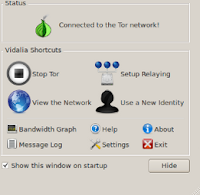
You will see a onion like icon in quick launch bar on your windows bottom right corner.Click on that icon.You will see a window similar to the above one.
Click on
start tor on tor window.Be sure that you are connected to the network of your organization or institute.Wait until the message on tor window changes to
connected to the tor network.Now you are done.All you have to do is to change the connection settings of the program which has been blocked to the settings given below..
proxy-
127.0.0.1port-
9050Eg to use bit torrent
go to
start ->
all programs ->
bit torrent->
options ->
preferences->
connectionin right window under proxy server enter
127.0.0.1 for
proxy and enter
9050 for
port.
Now download any file through torrent protocol.
Similarly we can use messengers if they are blocked
for Eg to configure gtalk go to
start ->
all programs->
google talk->
google talk.
click on
settings on gtalk window.Go to
connection and in the right window that displayed
click on
use the following proxy.Enter
127.0.0.1 for
host and enter
9050 for
port.Click ok.
Now signin in gtalk using your id and password and start chatting with your friends or relatives.
We can use our browser to access any blocked website.for firefox vidalia automatically installs a addon.To access any blocked website using firefox click on the bottom right corner of the firefox window where it is written
tor disabled.you will see it changing to
tor enabled when you click it.it also changes its color from red(disabled state) to green(enabled state) .Now you can freely access any blocked website.


